 Expresso
Your preflop charts, always next to the table.
Drop in screenshots of your charts. Expresso Charts turns them into one clean, readable style and fills the free space beside your tables, on every monitor.
Windows 10 / 11 · English & français · Charts stay on your PC · Cancel any time
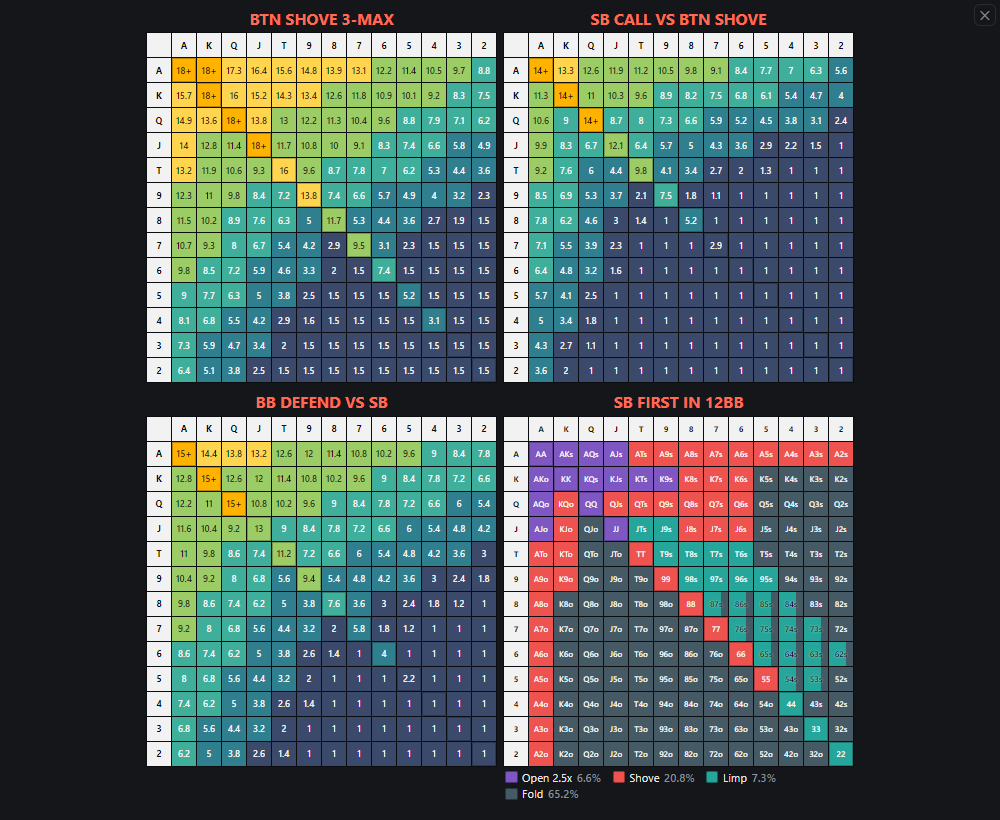
Boards fill the free space beside your tables and never cover them.
Everything you need while you grind
Built for fast 3-max formats, where you need the right chart at a glance and nothing in your way.
Import from screenshots
Paste or drop images, even several at once. Every chart in the picture is found automatically, even 8 in one screenshot, and the numbers, colours, titles and legend names are read for you.
One clean style
Charts from different coaches and tools all get the same colours and layout, so you read them instantly. Prefer the original look? Keep a chart's own colours with one tick. Fully editable.
Fills the free space
Boards are placed next to your tables automatically and move when your tables move. Main screen full of tables? They go to your second monitor. Or plan your own spots in practice mode.
Number & action charts
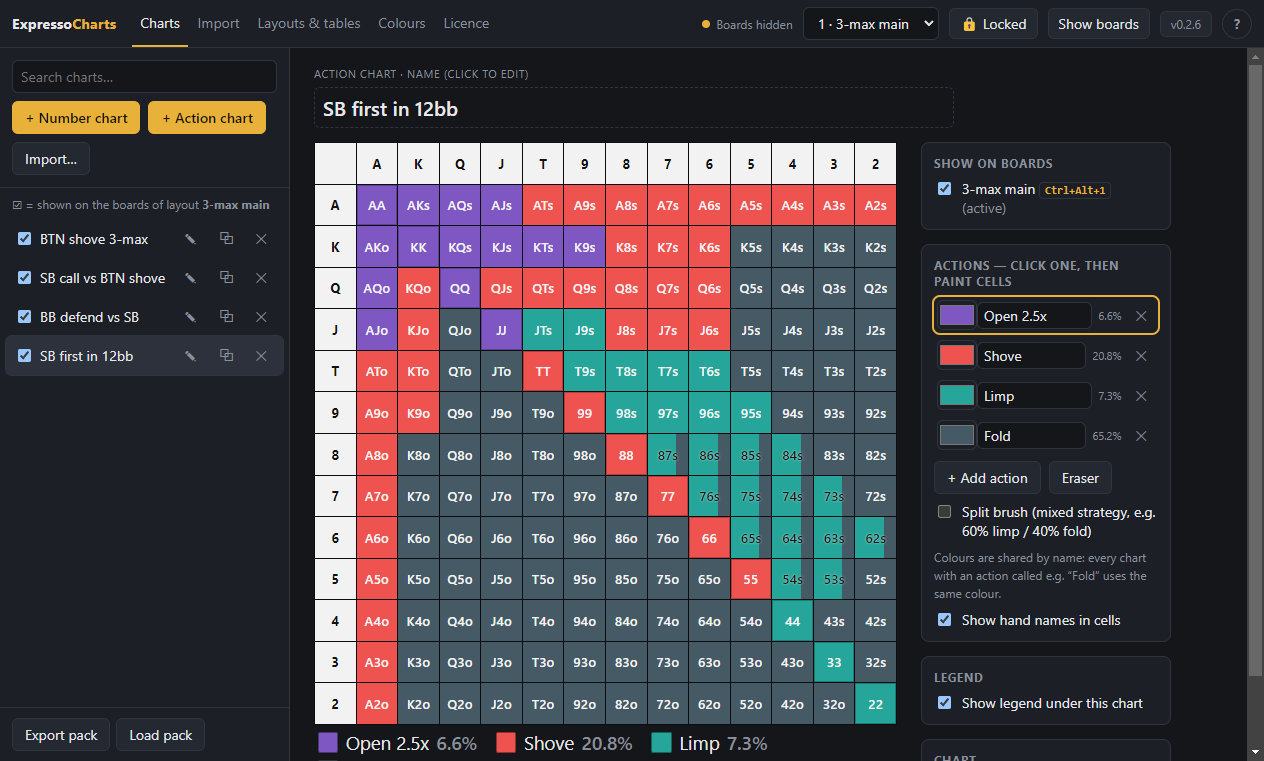
Stack-size charts (8.5, 17+…) and colour charts (all-in, limp, fold) with split cells for mixed strategies and a legend with range percentages.
Layouts & hotkeys
Prepare several layouts and pick one with Ctrl+Alt+1…9 before you sit down; it stays fixed while Winamax is open. Lock positions with Ctrl+Alt+L, hide charts with the small × or Ctrl+Alt+H. Right-click to zoom.
Private by design
Your charts are stored only on your computer, encrypted. Nothing is uploaded. The app windows can't be screenshotted or screen-shared.
Automatic backups
An encrypted backup of your charts and layouts is saved on your PC every week, and you can restore any of the last 8 in one click.
English & français
The whole app is available in English and French. It follows your Windows language, or pick one in the settings.
Ready when you are
Quick installer, no admin rights needed. Optionally starts with Windows, minimized, so your charts are ready before you open Winamax. Updates install in one click.
How it works
Set up once in a few minutes, then just open your tables.
Import your charts
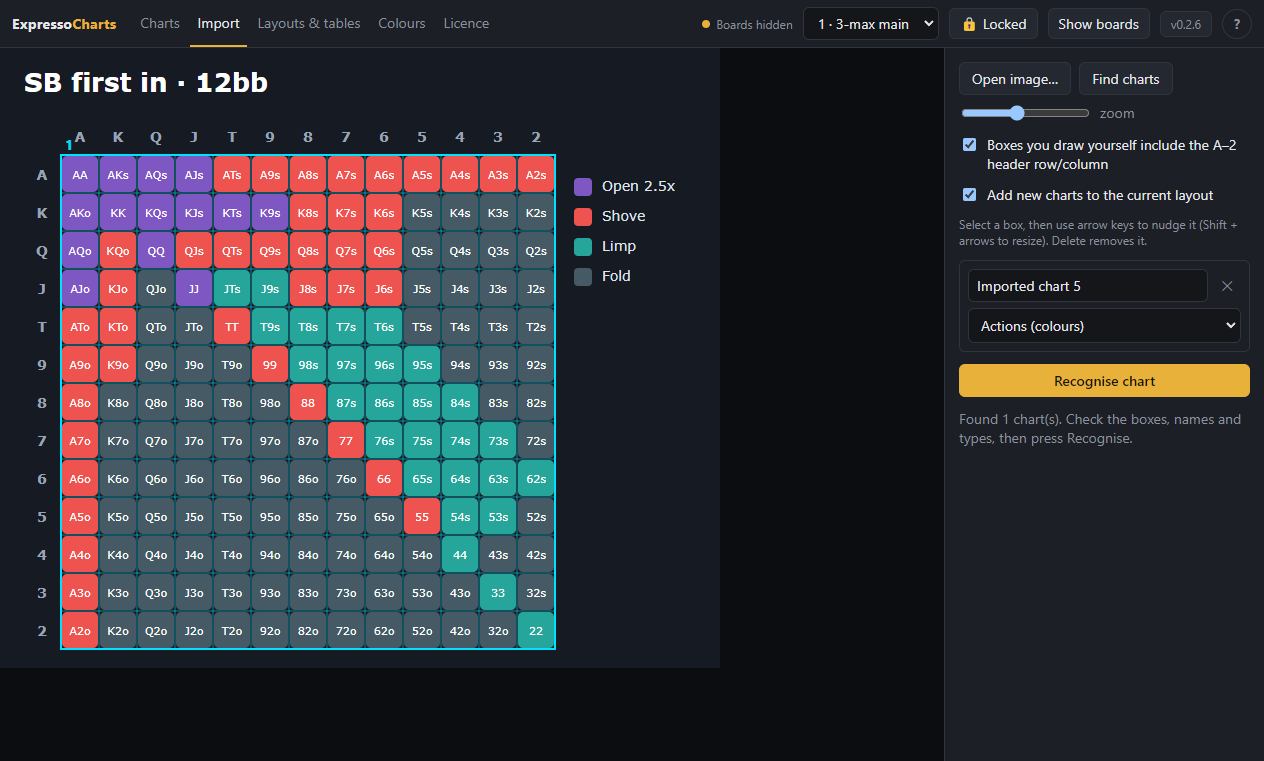
Paste a screenshot (Ctrl+V), drop an image or open several files at once. Every chart in them is found and read automatically, numbers and colours alike.
- One screenshot can contain many charts.
- Titles and legend names are read for you.
- Hard-to-read cells are highlighted for a quick check.
Tidy them up
Fix any cell with a click, rename actions, paint mixed strategies and turn on a legend. Every chart follows the same colour style.
Pick a layout and play
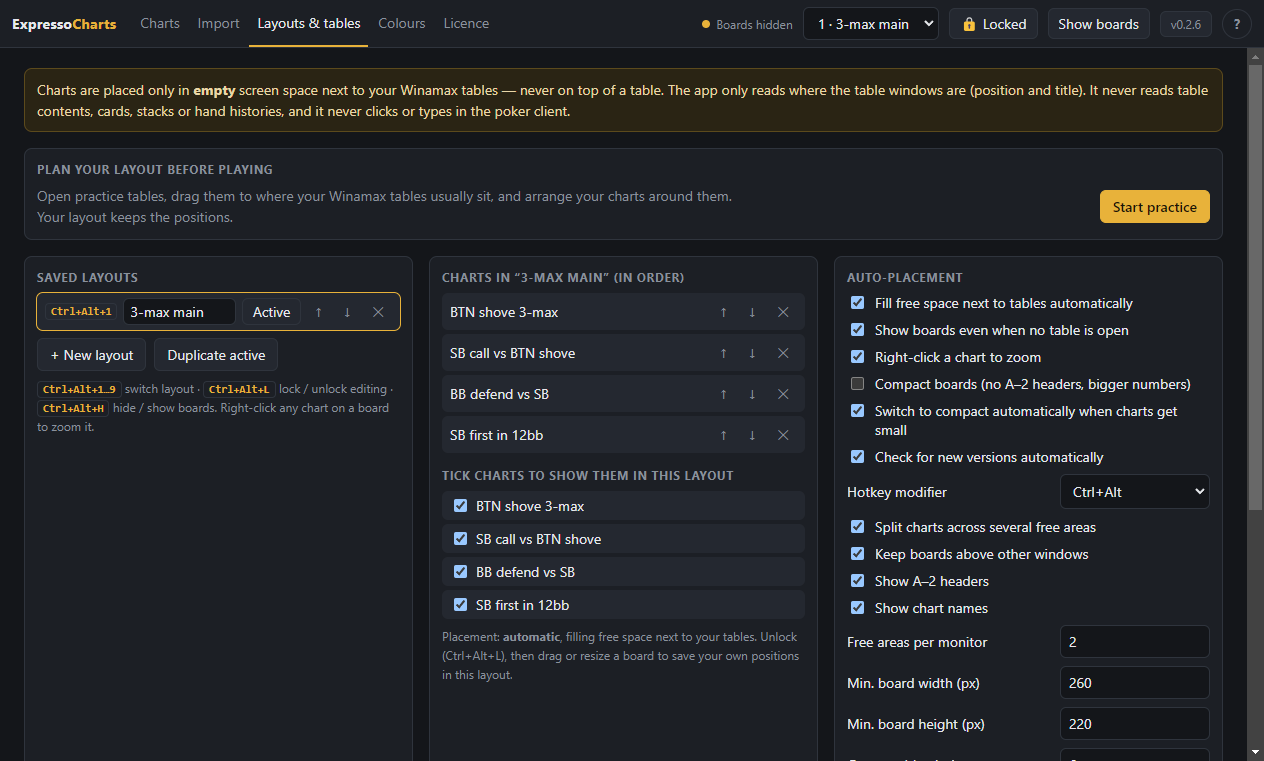
Tick which charts belong to a layout. When your tables open, the charts appear in the free space next to them, on every monitor.
- Pick your layout with Ctrl+Alt+1…9 before playing: while Winamax is open it stays fixed. Ctrl+Alt+L locks or unlocks positions.
- Practice mode: plan your layout before playing with placeholder tables you drag where your real tables go.
- Tables fill your main screen? The charts move to your second monitor.
Built for fair play
Expresso Charts is a reference tool: it shows the charts you prepared before playing, nothing more.
What it does
- Shows your own static charts, prepared in advance
- Reads only where your table windows are, to place charts beside them
- Keeps the same set of charts for the whole session; switching layouts is locked while the poker client is open
- Locks the chart library and editor while the poker client is open
What it never does
- Read cards, stacks, positions or hand histories
- Choose a chart for you based on the game
- Click, type or act in the poker client
- Send your charts or data anywhere
Expresso Charts is an independent product and is not affiliated with, endorsed by or connected to Winamax or any poker site. Poker sites set their own rules on third-party software. Please check the rules of the site you play on before using any tool.
Simple monthly plans
Every plan includes all features; plans differ only in how many monitors the charts use. One licence per computer. Prices include VAT where it applies. Cancel any time.
Pro
- Up to 2 monitors
- All features
- Charts move to your 2nd screen when the 1st is full
- Priority help by email
Unlimited
- Any number of monitors
- All features
- Priority help by email
- For multi-screen grinders
Want to try first? Download the app, then ask us for a free 3-day trial code with the machine code it shows. The trial includes up to 2 charts on 1 monitor.
For poker schools & coaches
Give your students the same charts, in the same style, at the table. The more seats you take, the less each one costs.
| Seats | Price per seat | You save |
|---|---|---|
| 1–4 | €17 / month | regular Pro price |
| 5–9 | €13.60 / month | 20% |
| 10–24 | €11.90 / month | 30% |
| 25+ | €10.20 / month | 40% |
Included for schools
- Pro features on every seat (up to 2 monitors)
- Your own chart pack: build the charts once and hand your students an encrypted file they import in one click
- One invoice per month for all seats
- Add or remove seats as your student list changes
- Activation codes for all students sent together
Prices per seat per month, VAT included where it applies. Yearly billing and larger groups on request.
Request a school offerQuestions
Is it allowed on Winamax?
Expresso Charts only shows static charts you prepared yourself, never reads the game, never picks a chart for you and locks the chart editor while the poker client is open. Each poker site sets its own rules and can change them, so please check the current rules of the site you play on; you are responsible for how you use the software.
Which computers does it run on?
Windows 10 and Windows 11 (64-bit). Install it with the small installer (no admin rights needed), or use the portable version if you prefer a single file that runs without installing.
How do I activate it?
After you subscribe, follow the activation steps in your purchase email: start the app, open the Licence page and enter your code there. Each licence works on one computer at a time.
Can I import several charts from one screenshot?
Yes. The app finds every chart grid in the picture automatically, even a sheet with eight charts, and reads each one. You can still draw a box by hand if a chart is missed.
Is there a free trial?
Yes: 3 days, with up to 2 charts on 1 monitor, so you can see how it works with your own charts and tables. Download the app and send us the machine code it shows to get a trial code.
How do updates work?
When a new version is out, a bar appears at the top of the app. Click Update now: the update downloads in the background while you keep using the app, then click Restart now, or it installs by itself the next time you close the app. Every update is digitally signed and checked before it's installed.
Where are my charts stored?
Only on your computer, encrypted. They are never uploaded. The app also keeps weekly encrypted backups on your PC, and you can export an encrypted pack file to move your charts to another PC.
Is the app available in French?
Yes. The app is fully translated into French and switches automatically when Windows is in French. You can also choose the language in the settings.
Something isn't working. How do I get help?
Open the Licence page in the app and click Save diagnostics, then email us the file. It contains your app version, screen setup, settings and error messages, but never your charts.
Do you offer group or school prices?
Yes. Poker schools, coaches and teams get up to 40% off per seat. See For poker schools and ask us for an offer.
How do I cancel?
Any time, from the link in your purchase email. Your plan stays active until the end of the period you paid for.